
How we mask PII before the model sees it
A walkthrough of how ZeroSight detects sensitive data, replaces it with placeholders, and restores it only for the authorized reader, so the model works on structure instead of secrets.

The problem
Your team is already pasting customer data into AI chat. A support agent drops a whole ticket into a chatbot to draft a reply. An analyst pastes a spreadsheet row to get a quick summary. A developer pastes a stack trace that still has a live API key buried in it. None of these people are trying to leak anything. They are trying to finish something, and the fastest tool within reach happens to send whatever they type straight to a third party.
The people accountable for that data usually cannot see any of it. The tooling that watches for data loss was built for email, file shares, and endpoints. It does not sit inside a browser tab that is talking to a model provider. So the visibility a security team has everywhere else in the stack falls to zero at exactly the moment sensitive data leaves the building.
That leaves most teams reaching for one blunt answer, which is to ban the tools. Bans do not hold. People open a personal account and keep going, and now the same data leaves through a channel nobody controls at all. The real choice was never AI against no AI. It is uncontrolled AI against AI with a privacy layer standing in front of it. This is the story of how that layer works.
Finding what matters
Nothing can be protected until it has been found, so detection comes first. It runs in two places, and the difference between them is the whole point.
The first place is the browser. As someone types, a lightweight pattern check highlights the obvious sensitive values right there in the composer. This layer exists for the person doing the typing. It is instant, it never holds up the message on a network call, and it is deliberately not the thing that decides what happens next. A check that lives in the browser can always be turned off or worked around, so we treat it as a helpful heads-up and nothing more.
The second place is the server, and this is the layer that actually decides. The moment a message is sent, the server runs machine-learning entity detection over the text before a single character is forwarded to a model. This detector reads context, so it can tell that a lone first name in one sentence is harmless while a full name sitting next to an address and a date of birth is a person who can be identified. It reaches well past emails and card numbers into health identifiers, financial account details, government IDs, credentials, and a long list of other regulated or risky values.
That detector runs on our own infrastructure. It lives inside the same trust boundary as the rest of the platform, which means the raw text being inspected never travels to some third-party detection service to be read. That one fact is what keeps the whole promise honest. If detection were handed off to an outside API, the raw data would already have left your boundary just to be scanned, and the guarantee would be broken before the first placeholder was ever written.
The categories the detector covers are wide. The chart below groups everything it looks for so the shape of that coverage is easy to take in at a glance.
131 entity types across 11 categories
Turning secrets into placeholders
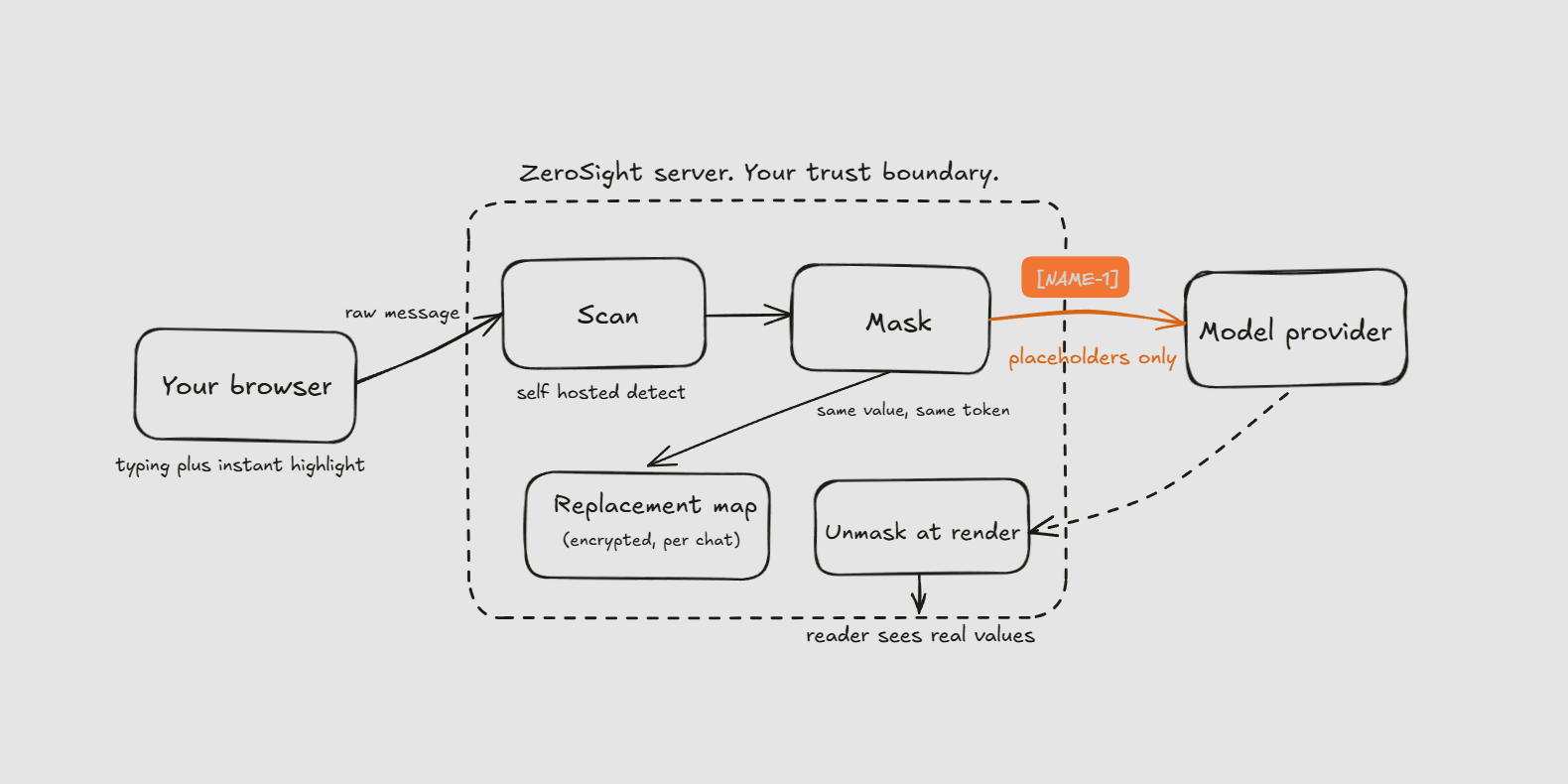
Once the server knows where the sensitive values are, it swaps each one out for a
stable placeholder. A name becomes a token like [NAME-1]. The next distinct name
becomes [NAME-2]. An account number becomes its own token, and so on across every
category the detector found.
The rule that makes this useful instead of lossy is consistency. The same real value always maps to the same placeholder inside a conversation, and that mapping lives in a replacement map that belongs to a single chat. If a customer name appears in the first message and again five turns later, both turns carry the identical token. The model can reason about the same person across the whole thread without ever being told who that person is. This is the line between masking and plain redaction. Redaction deletes context and leaves the model guessing. Masking keeps the shape of the conversation intact and only hides the values inside it.
That replacement map is sensitive by its very nature, because it is the one place that knows how to turn a token back into a real value. It is encrypted at rest, and it is append-only, so a value that was masked once stays mapped for the life of the chat. The map is never written down anywhere in plain text.
What the model actually sees
From the model's side of the wire, nothing unusual is going on. The masked text
arrives looking like an ordinary message, and the placeholders read as if they had
always been the real values. The model is told to treat each token as a normal piece
of the text and to carry it through into its answer unchanged. It writes about
[NAME-1] exactly the way it would write about a real name, because as far as it can
tell, that is the name.
Tools are the interesting case. When an answer needs something from outside the platform, such as a web search, that outbound request is another door out of the trust boundary, and it has to be treated like one. So the same detection gate runs again on the way out, and a sensitive value it newly finds in that request is redacted before the request is allowed to leave. The public results that come back are real and useful, because a search still returns ordinary public information. The point here is plain. A privacy layer with an unguarded exit is not a privacy layer, so every path that leaves the boundary is checked, not only the first one.
Putting the real values back
The masked form is what the model works on, but it is not what a person should have to read. When the response comes back, the platform uses that same per-chat replacement map to slot the real values back into place for the reader who is authorized to see them. The answer on screen talks about the real name, the real account, and the real diagnosis, so it is immediately useful. Restoration happens on the way to the screen, driven by the same map that did the masking, so the two sides can never disagree.
Because both forms are known, the reader can look at either one. A simple toggle flips the view between the restored values and the exact placeholder text the model actually received. That turns out to be a useful thing to be able to show an auditor. It is one click to demonstrate that the model was working on tokens the entire time and never touched the real data.
What we refuse to do
A privacy layer is defined as much by its restraint as by its features, so it is worth being blunt about the things we choose not to do.
We do not leave raw prompt text lying around. The original message exists only long enough to be scanned and processed, and then a purge step clears it within about a minute. The masked form is what carries forward into the conversation history, so later turns never re-expose an earlier value.
We do not feed your prompts into model training. Sending customer prompts off as training data is a setting, and that setting is off by default and stays off.
We do not store replacement maps in the clear, and we do not lean on the browser to be the enforcer. The client-side highlight is a courtesy for the person typing. The gate that decides what a model is allowed to see lives on the server, where it cannot be clicked away. And if any part of that path fails, the system is built to hold the raw data back rather than forward it, because the safe move when something breaks is to send less, not more.
That is the whole shape of it. Detect on your own infrastructure, replace real values with stable placeholders, keep the map that knows the difference encrypted and on the server, let the model work on structure, and restore the real values only for the person who is allowed to see them.